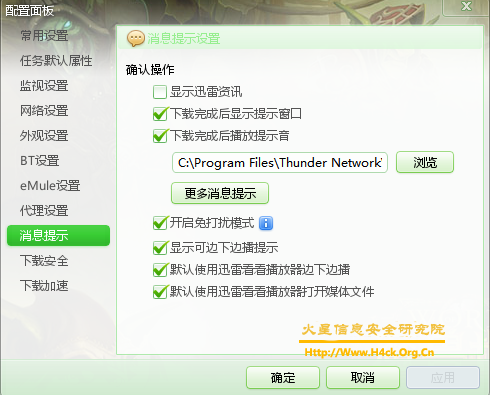
迅雷的资讯弹窗只需要从设置界面设置一下即可,但是广告却需要vip才能关闭,这里给出一个广告去除补丁。猛击此处下载补丁程序,将程序放入thunder.exe的同级目录下运行即可。如果没有安装迅雷猛击此处下载! (需要确保安装的迅雷版本为7.1.4.2100,如果不是该版本请不要运行该补丁程序,网盘下载地址!)
PS:
目前我还没有发现怎样可以把迅雷右侧的那个动态界面给去掉,谁知道的或者有什么想法的可以留言,给我点提示。嘎嘎。

黑客程序媛 / 逆向工程师 / 人工智能学徒 / 用爱发电的独立开发者
迅雷的资讯弹窗只需要从设置界面设置一下即可,但是广告却需要vip才能关闭,这里给出一个广告去除补丁。猛击此处下载补丁程序,将程序放入thunder.exe的同级目录下运行即可。如果没有安装迅雷猛击此处下载! (需要确保安装的迅雷版本为7.1.4.2100,如果不是该版本请不要运行该补丁程序,网盘下载地址!)
PS:
目前我还没有发现怎样可以把迅雷右侧的那个动态界面给去掉,谁知道的或者有什么想法的可以留言,给我点提示。嘎嘎。

This is just a QQ International Today Remover,what it dose is just as the name saying,remove the today nag windows.I just cracked the plugin self check functions.so that u can add or delete plugins as u wish(if u dislike the plugins tencent forced u to use, u can just delete it.).Click here to download the patch file (window xp only, if u are using windows 7,just read the bellow contents.thx )[there is something wrong in the patch file ,so i delete the download link.],and just place it into the QQ installed directory(the default directory is C:\Program Files\Tencent\QQIntl), run the program and click patch to remove the today popup window.lol.
if u find any problems or bugs just leave a message here,i will have a try to solve the problem.lol.
ps:
if u don’t have QQ International installed just click here to get one.

昨天看到这个东西的, 和以前的版本相比貌似加了些什么东西。看了一下认证模块没变,于是直接替换了。嘎嘎,并且貌似也没问题,但是这个东西却没发现注册相关的功能到哪里去了,难道是不用注册了? :beurk:不太像,神奇。  猛击此处下载!( 程序是.net编写的,需要安装.net 运行库。默认用户名为obaby,登录密码为123456,如果要删除该用户只需要将程序目录下文件名为obaby的文件即可。)

OllyDbg is a 32-bit assembler level analysing debugger for Microsoft® Windows®. Emphasis on binary code analysis makes it particularly useful in cases where source is unavailable. OllyDbg is a shareware, but you can download and use it for free.

以下是文章原文:
最近太累了,公司原因一方面,论坛是最主要原因,先是国内被和谐了,这会好不容易折腾搬到国外了,你倒好,开了不到一天,你就给主页改了,服务器我没权限,你想改主页就改改吧,如果改主页也算检测那么我也不说了,域名我已转走了,论坛安全没做好,我不想还丢了人家服务器权限,我担不起这责,现在我不准备折腾了,直接不开了,你去接受大家的膜拜吧,图我还给你继续贴上.
PS:就我个人的感觉“吾爱破解”还是一个相当不错的论坛的,可惜却没人能容的下。

本次升级了一下程序的dll文件代码,加入了透明度自定义。如果不习惯当前的透明度可以手工编辑Glass.ini文件,在AlphaBlendValue=之后输入一个新的数值(0-250之间),重新运行cmd的时候将会自动从这个文件中读取透明度数值。另外这次没有使用上次的编辑程序入口点的方法来达到目的,所以这次修改的版本比以前的那个版本要稳定(刚才测试了一下,频繁崩溃,竟然是由于加壳造成的。如果还有崩溃的情况就给我留言吧。 😎 😎 )。  猛击此处下载文件,安装方法不建议使用替换原来的cmd.exe的方法,可以参考这篇文章。